
Google Workspace Integration
This guide explains how to integrate Google Workspace with OpenClaw Ultra using GoG CLI.
Supported Services
| Service | Capabilities |
|---|---|
| Gmail | Read, send, search, organize emails |
| Calendar | Events, schedules, reminders |
| Drive | File management, sharing, search |
| Docs | Create, edit, format documents |
| Sheets | Spreadsheet operations, data queries |
| Slides | Create and edit presentations |
| Contacts | Manage and sync contacts |
| Tasks | Create and track tasks |
Prerequisites
| Item | Requirement |
|---|---|
| OpenClaw Ultra | Installed and configured |
| Google Account | Active Gmail/Workspace account |
Step 1: Install GoG CLI in OpenClaw Ultra
- Open OpenClaw Ultra and start a new chat
- Ask the agent to install GoG CLI:
Install GoG CLI for Windows - The agent will help you download from the official release and add it to your system PATH
- Verify installation:
gog --version
Step 2: Create OAuth Client
- Visit Google Cloud Console
- Create a new project
- Enable required APIs (Gmail, Calendar, Drive, Docs, Sheets, Slides, Contacts, Tasks) - whatever you actually need
- Configure OAuth consent screen for "External"
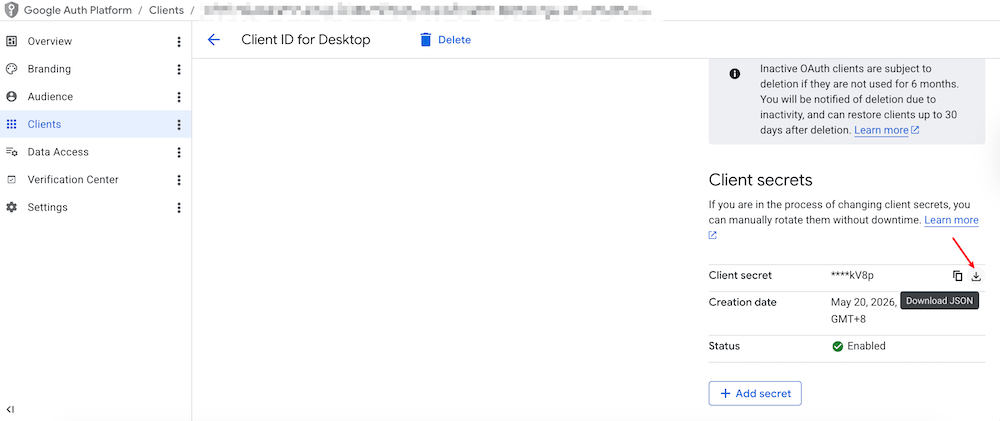
- Create a Desktop app OAuth client at OAuth clients
- Download the JSON file and save it to a safe location
Step 3: Authenticate in OpenClaw Ultra
- In the chat, provide the OAuth JSON file path and authenticate:
gog auth credentials /path/to/your/client_secret.json gog auth add [email protected] --services gmail,calendar,drive,docs,sheets,slides,contacts,tasks - A browser window will open for authorization
- Grant the requested permissions
- The agent will confirm when all services are connected
Step 4: Start Managing Google Workspace
Now you can use natural language in the chat:
Gmail
Check my unread emails from todaySend an email to [email protected] about the meetingSearch emails about project updates
Calendar
Schedule a meeting tomorrow at 2 PMShow my calendar for this weekCreate an event titled Team Review
Drive
Upload this file to my DriveFind documents about Q4 planningShare the report with [email protected]
Docs
Create a new document titled Meeting NotesEdit the last document I created
Sheets
Show data from Sheet1 A1 to D20Create a spreadsheet for budget tracking
Slides
Create a presentation from this markdownUpdate the weekly status slides
Contacts
Show contacts from Acme CorpAdd a new contact for Jane Doe
Tasks
Create a task to review the proposalShow my tasks for this week
Security Tips
WARNING
- Only grant necessary permissions
- Review connected apps regularly in your Google Account
- Revoke access when no longer needed
Troubleshooting
| Issue | Solution |
|---|---|
| Authentication failed | Re-run authentication in chat |
| Commands not working | Verify GoG CLI installation |
| Sync errors | Check internet connection and retry |